Indian Wedding Invitation Template Tradition & Modern Design (Free Download)



Hello everyone, Roshan here! Today I’m excited to walk you through a beautiful Indian Wedding Invitation Template that truly captures the heart of tradition in a modern, convenient format. If you’re planning a wedding (or designing for one), you know how important the invitation is – it’s the first glimpse your guests get of the big day. This particular invitation design feels warm, vibrant, and personal. It tells the world about your one-of-a-kind love story and sets the stage for an event everyone will remember, all while being easy to edit and print on your own.
Whether you’re a designer looking for the perfect wedding flyer style layout or a couple seeking an invitation design that honors Indian tradition, this template might just steal your heart. Let’s dive into what makes it special!
Blending Indian Tradition with Modern Templates
Indian weddings are known for their rich colors, intricate patterns, and heartfelt traditions. From golden mandalas to paisley motifs, the design elements often carry deep cultural significance. However, in today’s digital age, we also crave convenience and a clean look. How do we marry the two? (Pun intended!)
This template is a great example of tradition-meets-modern. It incorporates classic Indian design touches – think ornate floral patterns and mandala-like graphics – within a contemporary layout. The result is an invitation that feels regal and traditional, yet clean and uncluttered. For instance, you might notice a beautifully detailed motif reminiscent of henna or rangoli art, set against a sleek background with elegant typography. By using a modern template that still nods to cultural elements, you get the best of both worlds: timeless Indian artistry and up-to-date design. It’s perfect for couples who want to celebrate their heritage while keeping things stylish and easy to read.
A Closer Look at the Invitation Design
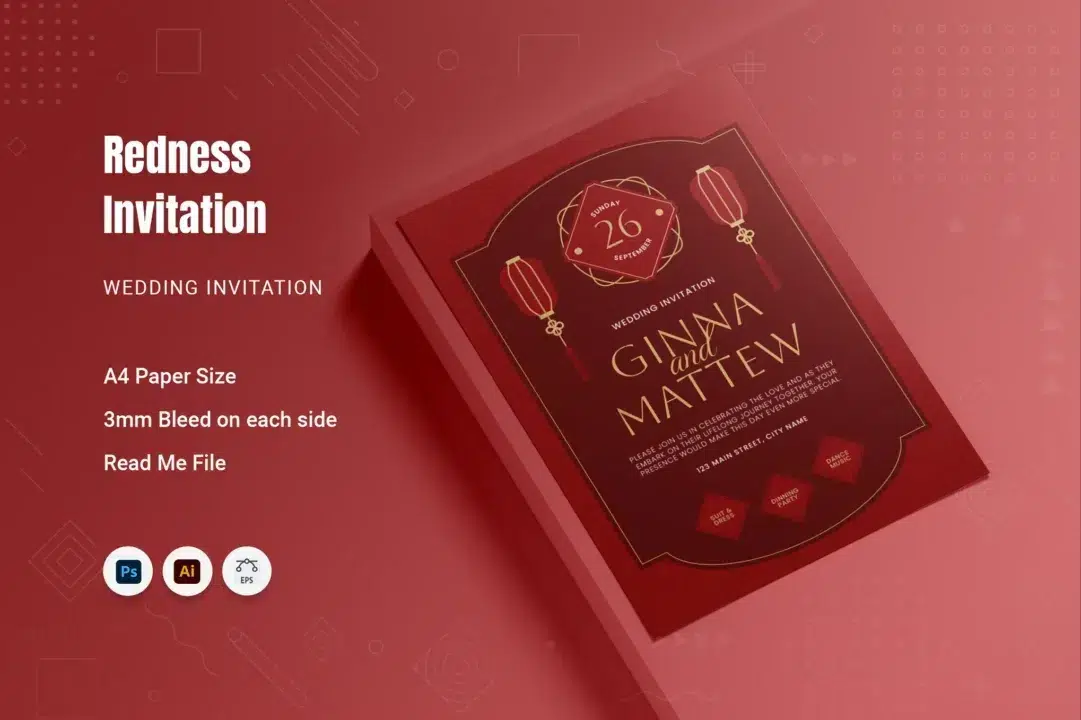
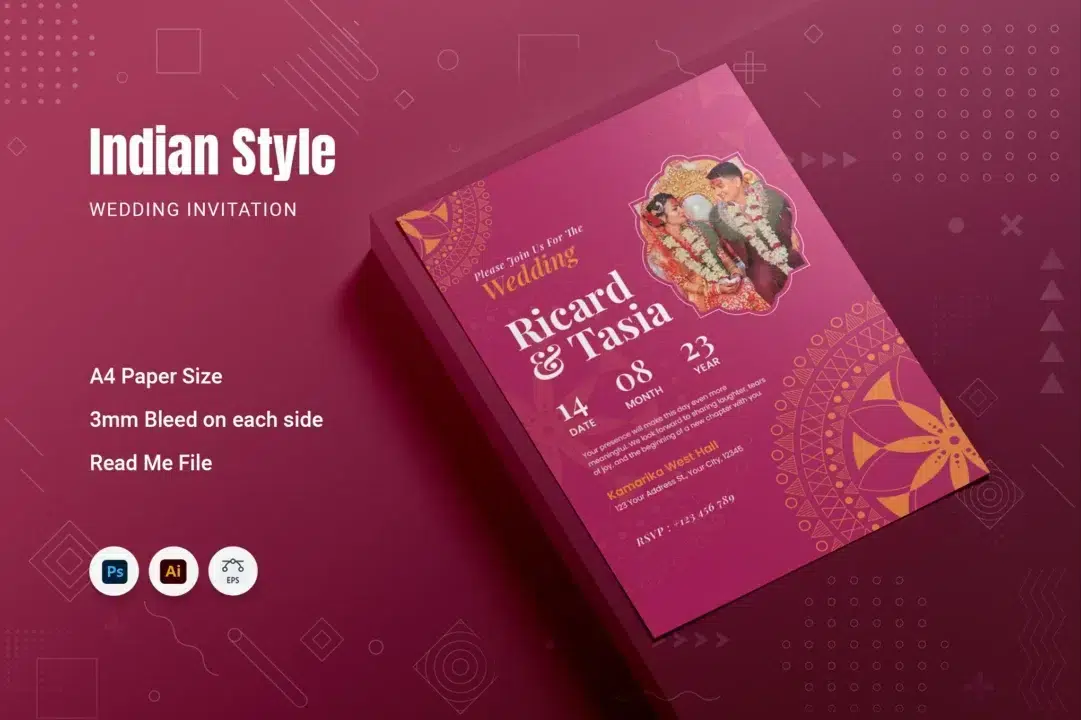
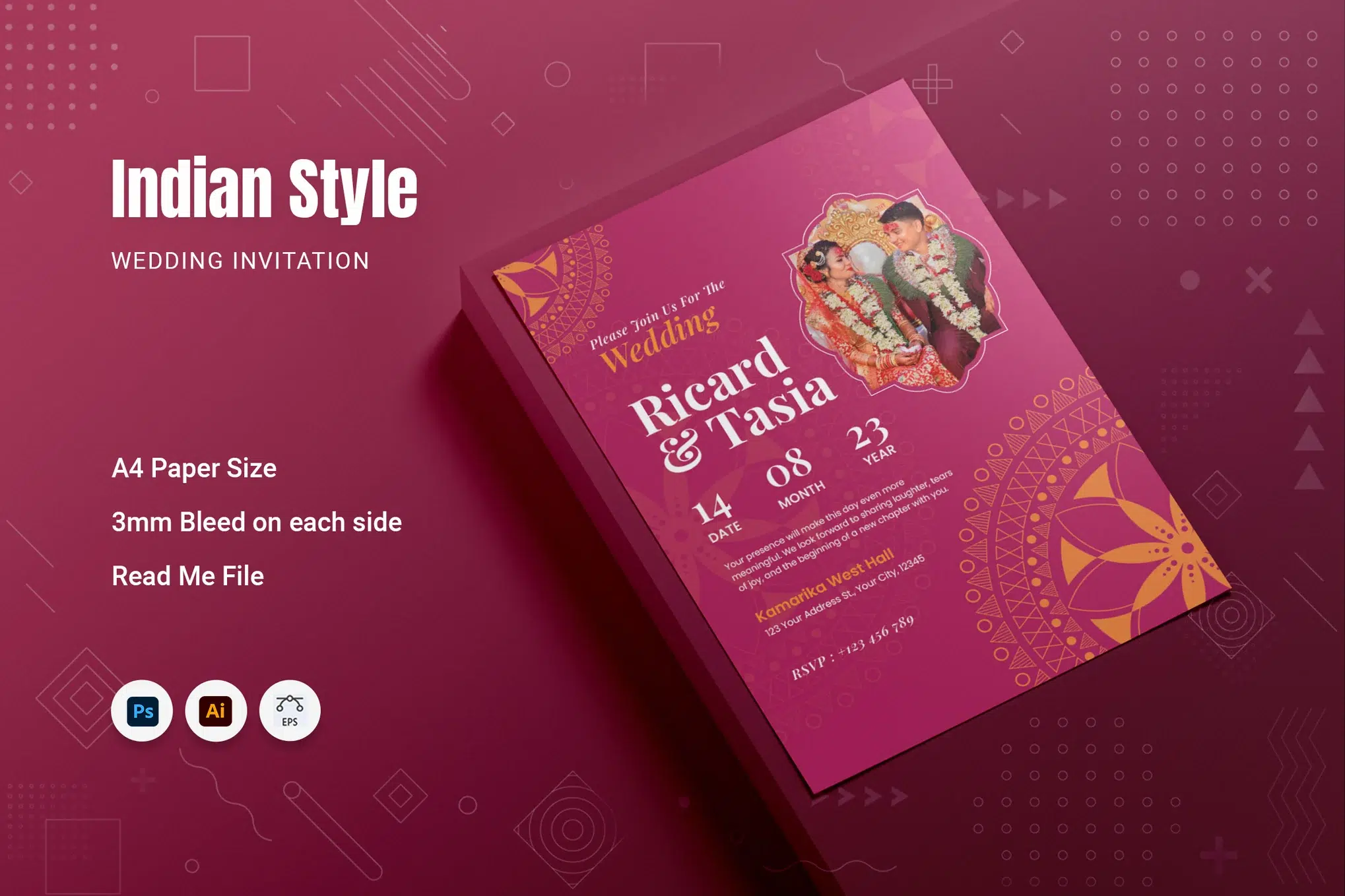
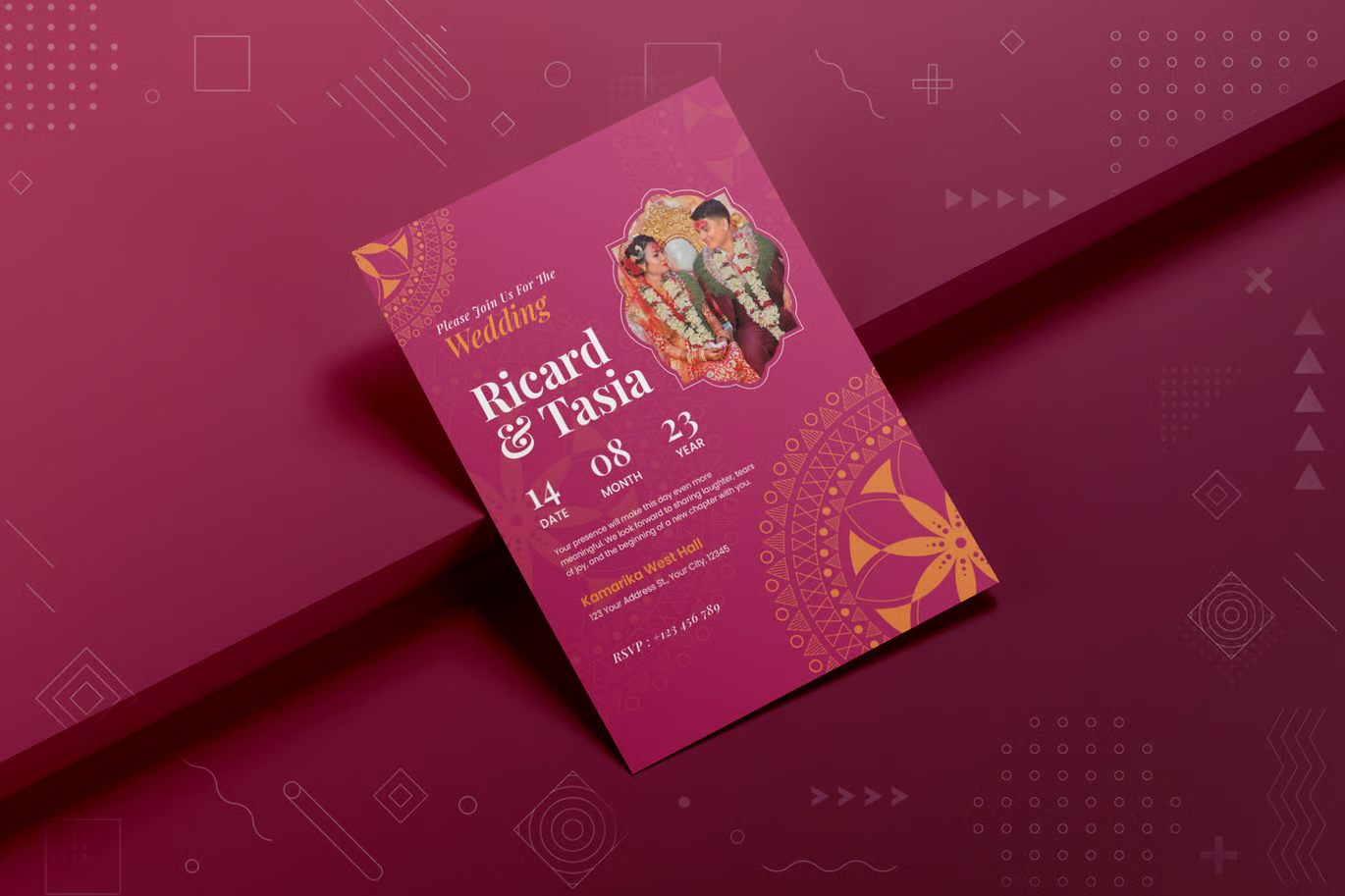
A sneak peek at the Indian Style Wedding Invitation template, showcasing its rich colors and elegant traditional motifs. The design balances a vibrant background, golden accents, and a clean layout for text, creating a luxurious yet personal look.
Let me paint you a picture of this Indian Wedding Invitation Template. The layout is striking and luxurious. It features a vibrant, rich background color (imagine a deep maroon or royal fuchsia tone) that immediately catches the eye. Layered on top of this are elegant golden motifs – you’ll see intricate patterns inspired by traditional Indian art, like mandalas or lotus flourishes, placed in the corners and edges for a touch of grandeur without overwhelming the design.
One of my favorite parts of this invitation design is the photo placeholder: there’s a beautifully framed space where you can insert a photo of the happy couple. This adds a personal, modern touch to the invite – your guests will love seeing a glimpse of you two smiling together! Don’t want a photo? No worries; the frame can just as easily hold an emblem, monogram, or be left with a decorative pattern. The typography is another highlight: the names of the bride and groom stand out in a graceful, stylish font (think elegant script or a bold serif), while the details (date, venue, etc.) are in a clear, easy-to-read font. Everything is laid out so that the information is accessible at a glance.
The tone of the template is both celebratory and sophisticated. Small details, like delicate flourishes and well-spaced text, give it a polished feel. Overall, it’s a design with “luxury looks” that will impress your family and friends — yet it still feels inviting and personal. And as a bonus, this template isn’t just one page – it comes with a matching RSVP (response card) design! The RSVP card echoes the invite’s style (same colors, motifs, and fonts), which means your whole wedding stationery suite will look beautifully cohesive and thoughtful.
Who Is This Template For?
You might be wondering, “Is this template right for me?” Here’s the great news: it’s designed to be versatile and user-friendly, so a variety of people will find it useful and enjoyable.

- Brides and Grooms / Couples: If you’re a couple planning your own wedding, this template is a lifesaver. It’s perfect if you want a gorgeous Indian wedding invitation without hiring a professional designer. You can easily personalize it with your names, wedding details, and even a photo. It’s budget-friendly and gives you a high-end look for free. Plus, using this template is actually fun – it’s like crafting your own wedding card, with all the heavy design work already done for you!
- Graphic Designers: Are you a designer working on a wedding project for a client? This template can be a solid starting point or addition to your toolkit. It’s fully editable, so you can tweak colors, swap out motifs, or adjust layouts to suit the client’s theme. Using a pre-made invitation design doesn’t limit your creativity – it jumpstarts it. You save time on the basics and can focus on custom touches. And since the file is well-organized (layers and groups are named neatly), it’s a breeze to modify.
- Freelancers & Wedding Planners: Maybe you’re a freelancer who occasionally designs event stationery, or a wedding planner who likes to provide clients with design options. This Indian Wedding Invitation Template is ideal for quick turnarounds. You can produce a lovely invite and RSVP card in a short time, and the quality is professional. It’s especially handy if you have multiple weddings with different themes – the template is flexible enough to adapt to various color schemes or slight style changes (for example, you could recolor the background from maroon to royal blue or pastel peach to match a specific wedding palette).
In short, whether you’re a DIY bride/groom, a creative professional, or someone helping a friend with wedding prep, this template is made to make your life easier while delivering beautiful results.
Template Specifications
For my fellow design enthusiasts who love the nitty-gritty details, here are the key technical specifications of the Indian Wedding Invitation Template. I’ve organized them in a handy table for quick reference:
| Specification | Details |
|---|---|
| Size | A4 (8.2 × 11.7 inches) + 3mm bleed |
| Color Mode | CMYK (print-ready colors) |
| Resolution | 300 DPI (high print quality) |
| Pages | 2 pages (Invitation + RSVP card) |
| Files Included | AI, EPS, PSD formats (Illustrator & Photoshop) |
| Layers | Fully layered & organized for easy editing |
| Fonts | Free fonts used (links/included in download) |
A few points to highlight from the table: This template is in A4 size, which is 8.2 by 11.7 inches, a standard size that’s easy to print at any print shop. It also includes a 3mm bleed on each side – that’s a little extra margin for printing, ensuring your design extends to the edge of the paper without white borders (professional printers will know what to do with it). The color mode is CMYK and resolution is 300 DPI, which are the magic words for “print-ready” – your invite will print crisp and colors will come out beautifully rich and accurate.
You’ll get the design in multiple file formats: AI and EPS for Adobe Illustrator (or other vector editing software), and PSD for Adobe Photoshop. So you have options depending on what software you’re comfortable with. All files are fully layered, which means every element (background, motifs, text, photo placeholder, etc.) sits on its own layer – making it super simple to select and edit just what you need without messing up other parts. And yes, the fonts used are free! The download includes the font files or a note on where to get them at no cost, so you won’t have to buy any fonts to get the exact look from the preview.
Editing & Customization Guide
One of the best things about this Indian Wedding Invitation Template is how simple it is to customize. You don’t need to be a software wizard or a design expert. Let’s walk through the basic steps to edit the template and make it your own:
- Download and Unzip: First, grab the template files (see the download section below). They’ll come in a compressed .zip file. On a PC, just right-click the zip and choose “Extract All,” then follow the prompts. On a Mac, double-click the zip file and it will automatically create a folder with the contents. Inside, you’ll find your AI, EPS, and PSD files along with a helpful Read Me document.
- Install Fonts: Before opening the template, peek at the documentation or a text file that might be included for font info. The design uses free fonts, and they are either provided or the doc will give you links to download them. Install those fonts on your system (usually by double-clicking the .ttf or .otf files and hitting “Install”). This step ensures that when you open the invitation file, it looks just like the preview, with the correct typography.

- Open the File in Your Software: Now, decide which software you want to use. If you have Adobe Illustrator, open the
.aifile for the invitation (and the second.aifor the RSVP card). If you prefer Adobe Photoshop, open the.psdfile. No Adobe? You can try using free tools: for Photoshop files, Photopea (a free online editor) can handle PSDs; for Illustrator/EPS, Inkscape is a free vector program. The experience is smoothest in the Adobe apps, but these alternatives can work in a pinch for basic edits.

- Customize Text: Once the file is open, start by editing the text. Click on the names, dates, venue details, etc., and replace them with your own information. The text boxes are already placed perfectly, so you just need to type in your details. For example, change “Ricard & Tasia” to your names, update the date, time, venue address, and any additional notes (like dress code or a favorite quote). The fonts and sizing are all set to look great, so even if you’re new to this, your text will stay nicely formatted.

- Add Your Photo (Optional): If the template includes a photo placeholder (it does in the main invitation design), you can insert your own picture. In Illustrator, there might be a masked layer or a clipping group – just place your photo into that layer and size it to fit the frame. In Photoshop, look for a layer labeled “Your Photo” or a smart object you can double-click to replace the image. Drop in that adorable engagement pic or a traditional portrait, save, and it should update in the invite layout. If you’d rather not use a photo, you can leave the beautiful motif that’s already there or swap it for another graphic.

- Change Colors or Motifs (Optional): The template’s default colors and artwork are chosen to reflect an elegant Indian theme (rich maroons, golds, and oranges that give a festive vibe). But you have the freedom to tweak colors to match your wedding theme! Want to go for a royal blue and gold scheme? Or a pastel pink and silver for a daytime wedding? No problem. In Illustrator, you can select the background or motif elements and simply choose new colors. In Photoshop, layers might have color overlay options or vector shape layers you can recolor. Because it’s all fully editable, you can also move things around – for example, reposition a motif or hide an element you don’t want. Play with it until you’re happy. And remember, you can always Undo if something doesn’t look right.

- Save and Export: After you’ve made all your edits, save your work (so you have the master file for any future tweaks). Then export a copy for printing or sharing. The recommended way is to export as a PDF for printing – PDFs will preserve the quality and formatting. In Illustrator, go to File > Save As or File > Export and choose PDF (make sure to select “High Quality Print” preset). In Photoshop, you can go to File > Save a Copy and pick PDF, or even save as a high-resolution JPEG/PNG if needed. PDF is great for professional print shops. If you’re emailing invites or sharing digitally, a JPEG might be convenient.

- Print Your Invitations: Now you’re ready to see it in action! You can print the invitations at home if you have a good printer, but for the best results, I recommend using a professional print service or local print shop. Because the file is set up in CMYK at 300 DPI with bleed, any printer will be able to produce a crisp, vibrant card. Use a nice quality cardstock paper to give it that luxe feel. Don’t forget to print the matching RSVP cards too – and include an envelope for guests to send them back. It’s these little coordinated details that really wow people.
That’s it – you’ve just customized your own Indian wedding invitation! 🎉 Tip: Always do a test print of one invite first, to make sure colors and margins look good, and proofread all the details. It’s easy to miss a typo when you’re excited. Once everything looks perfect, go ahead and print the full batch.
Download the Wedding Invitation Template
Now for the part you’ve been waiting for – getting your hands on this template. I’ve set up a futuristic download widget below to make the process smooth and easy. Go ahead and click the button in the widget to download your free Indian Wedding Invitation Template. The download includes both the invitation and RSVP card files, plus instructions. No catch, no cost – just a heartfelt gift to help make your wedding planning a bit easier and more stylish.
Once you’ve downloaded it, you can start editing right away. I genuinely hope this free download wedding template helps you create the invitation of your dreams. If you run into any questions while editing, don’t worry – I’ve got a brief FAQ below, and you can always reach out or leave a comment. Happy designing, and even happier wedding planning!
FAQ (Frequently Asked Questions)
Q: What software do I need to edit this template?
A: You’ll need a program that can open either Photoshop or Illustrator files. Adobe Illustrator (for the .ai or .eps) and Adobe Photoshop (for the .psd) are recommended for full control. If you don’t have those, you can try free alternatives: for example, use Photopea (a free web-based editor) to open and edit the Photoshop file, or Inkscape to work with the EPS vector file. The key is to use software that supports layers and text editing. The download comes with both options, so use whichever you’re more comfortable with. And don’t forget to install the fonts before you start editing!
Q: I’m not a designer – will I be able to customize this easily?
A: Absolutely! The template is built to be beginner-friendly. All the elements are pre-arranged, so you mainly just replace the placeholder text with your details and insert a photo if you want. The layers are clearly named (for example, “Background Color,” “Names,” “Details Text,” “Decorative Motif,” etc.), which helps you identify what to edit. Plus, there’s a Read Me guide included to walk you through any specific steps. If you can use Microsoft Word, you can handle this with a bit of patience – and the end result will look like a professional invitation design. And remember, you can always undo or not save if you make a mistake. It might even spark your creativity to try out different fonts or colors (just save a backup of the original file). Many couples who aren’t designers have successfully customized templates like this, and enjoyed the process too!
Q: Can I change the colors or use this design for a different theme/event?
A: Yes, you can change almost any aspect of the design. Want to swap in your own colors to match a theme (be it a pastel spring wedding or a royal gold-and-red traditional affair)? Go for it! All shapes and motifs can be recolored easily in Illustrator or Photoshop. You can also move or remove graphics if, say, you prefer a cleaner look. The text is fully editable, so you could repurpose this for other events – for example, an engagement party or a wedding flyer announcement – by changing the wording. The versatile format means you’re not limited to the Indian wedding theme either; it’s a template, so feel free to experiment and make it truly yours. The only thing to be mindful of is to keep a copy of the original in case you want to revert changes. And if you do repurpose it for something totally different, I’d love to hear about it – creativity knows no bounds!
I hope this guide and the free template help you create something truly special for your wedding day. Designing your own invitation can be incredibly rewarding, and with this Indian Wedding Invitation Template, you have a stunning starting point. It’s been a pleasure sharing this with you. If you have any more questions or want to share how your invites turned out, feel free to drop a comment.
Wishing you joy, creativity, and a lifetime of happiness! 🎊👰🏽🤵🏽